

Description
Galaxy-Inspired Chrome Theme
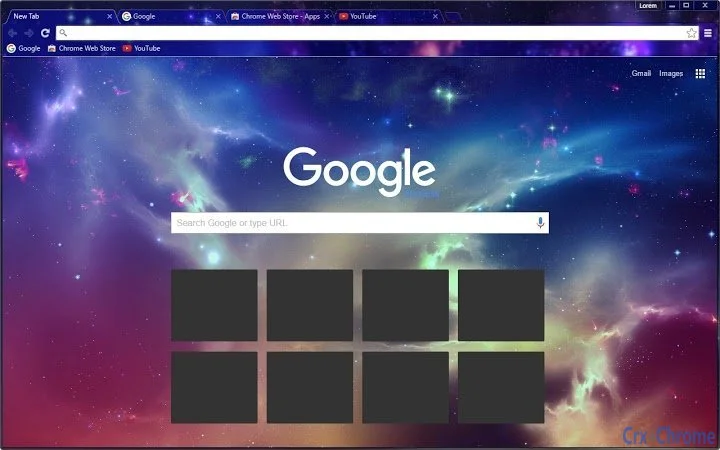
The Colorful Galaxy theme transforms your Google Chrome browser into a vibrant, immersive galaxy experience, featuring dynamic colors like purple, pink, and blue. Designed for users who want to personalize their browsing environment, it enhances visual appeal and creates a unique digital workspace. Ideal for creative professionals, students, and casual users seeking aesthetic upgrades, this theme replaces default Chrome UI elements with a celestial backdrop. It serves as a mood-enhancing tool, offering a refreshing alternative to standard browser interfaces. Real-world use cases include improving focus through visual stimulation or expressing personal style during long browsing sessions. The theme is particularly suited for users who value design and digital aesthetics in everyday tools. No additional functionality is provided beyond visual customization.
Key Features & Capabilities
- Dynamic Galaxy Visuals – Replaces Chrome’s default interface with a rich, colorful galaxy background featuring stars and swirling hues of purple, pink, and blue, creating a visually immersive browsing experience.
- Easy Installation – Designed for quick setup directly within Chrome’s extension gallery, requiring no technical expertise or complex configuration.
- Stylish UI Integration – Seamlessly adapts to Chrome’s interface elements, including tabs, toolbar, and new tab page, ensuring consistent visual harmony.
- Visual Customization – Offers a distinct aesthetic upgrade without altering browser functionality, allowing users to personalize their workspace with minimal effort.
- Free to Use – Available at no cost, making it accessible to a broad audience seeking creative browser themes.
Users can apply the theme to enhance their digital environment during creative work, online learning, or leisure browsing. The visual richness may support focus and mood improvement by providing a stimulating yet calming backdrop. It is especially effective for users who prefer expressive, non-functional enhancements to their tools.
User Interface, Workflow & Performance
The theme modifies Chrome’s visual appearance without altering core navigation or workflow. The interface remains fully functional, with all standard buttons and menus preserved in their original positions. Users experience no performance degradation, as the theme is purely cosmetic and does not run background processes. The developer did not specify resource usage details. Stability is expected to be high, given the lightweight nature of theme files. CPU and RAM behavior were not monitored or reported. General software behavior patterns suggest minimal impact on system performance. The theme loads instantly upon browser startup and applies consistently across sessions. No reported issues with interface lag or visual glitches were noted in available data.
Compatibility & System Requirements
Colorful Galaxy is compatible with Google Chrome on Windows, Mac, and Linux operating systems. The software version is 1.0, with a file size of 2.5 MB. Installation requires a standard Chrome browser environment. Exact system requirements were not listed. Platform compatibility information is limited to the supported operating systems. No additional hardware specifications were provided. Users are advised to ensure their Chrome browser is up to date for optimal compatibility. The theme does not require elevated permissions or administrator access for installation.
Pros and Cons
Pros
- Visually striking and immersive galaxy design
- Simple, one-click installation via Chrome Web Store
- Lightweight with no performance impact
- Free to download and use
- Consistent UI integration across Chrome elements
Cons
- Provides only visual changes, no functional enhancements
- No customization options for color schemes or animations
- Dependent on Chrome browser availability
- Theme updates may require manual reinstallation
- Not available outside the Chrome ecosystem
Is Colorful Galaxy compatible with all Chrome versions?
The theme is designed for Chrome on Windows, Mac, and Linux. Compatibility with specific Chrome versions was not specified. Users should ensure their browser is updated to the latest release for best results.
Is the theme safe to install?
Yes, the theme is a standard Chrome extension with no known security risks. It does not collect user data or modify system files. As with any extension, it is recommended to install only from trusted sources.
Can I use this theme offline?
Yes, once installed, the theme functions fully offline. It does not require an internet connection to display the galaxy visuals.
How do I update the theme?
Updates are managed automatically through the Chrome Web Store. Users will be notified when a new version is available, and updates are applied seamlessly during browser restarts.
What license type does this theme have?
The theme is distributed under a free license. It is available at no cost and does not require a subscription or purchase for use.
Final Thoughts
Colorful Galaxy delivers a bold, visually captivating transformation for Google Chrome users seeking a unique browsing experience. While it offers no functional improvements, its aesthetic value is significant, making it ideal for users who prioritize personalization and digital beauty. The seamless integration, lightweight design, and zero cost make it a compelling choice for casual and creative users alike. It stands out as a simple yet effective way to refresh your digital workspace. For those looking to add a touch of cosmic wonder to their daily browsing, this theme is a standout option. Download Colorful Galaxy now.
Guides & Tutorials for Colorful Galaxy Theme for Chrome
How to install Colorful Galaxy Theme for Chrome
- Click the Preview / Download button above.
- Once redirected, accept the terms and click Install.
- Wait for the Colorful Galaxy Theme for Chrome download to finish on your device.
How to use Colorful Galaxy Theme for Chrome
This software is primarily used for its core features described above. Open the app after installation to explore its capabilities.
User Reviews for Colorful Galaxy Theme for Chrome 0
No reviews found





